Apna Meter Apni Reading Power Smart App Sign up and Login
The Power Smart Application Apna Meter Apni Reading is a digital solution that allows electricity consumers in Pakistan to take control of their electricity bills. Through this app, users can submit their own meter readings, avoid overbilling, and quickly access bill and complaint services—all from their mobile phones. Here’s a step-by-step guide on how to sign up, log in, and add your meter using the Power Smart app.
Apna Meter Apni Reading Power Smart App Sign up and Login
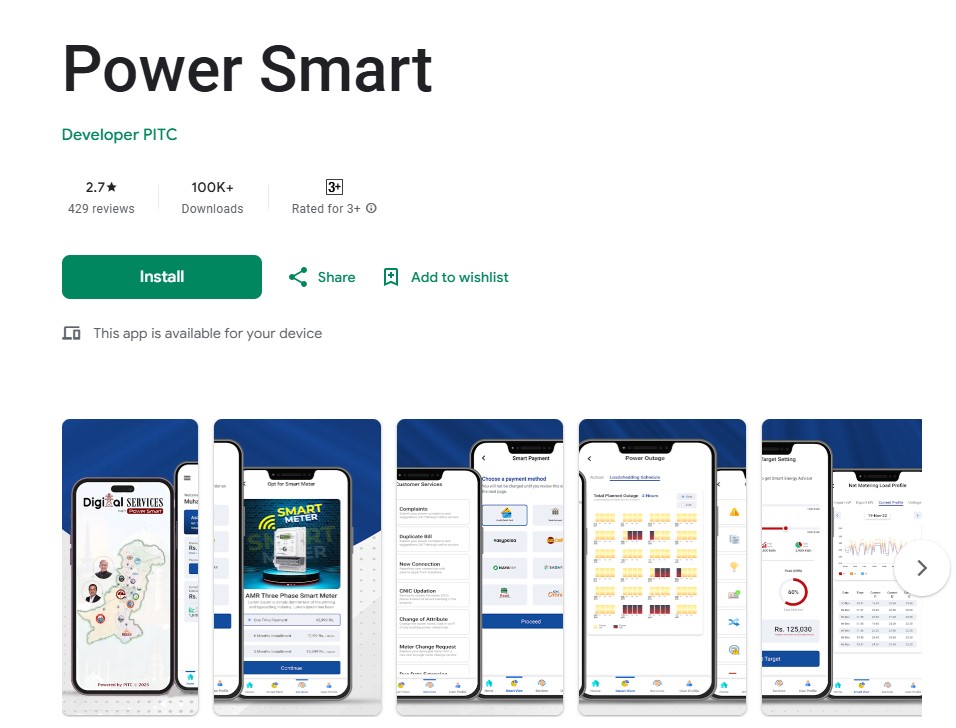
Step 1: Downloading the Power Smart App
- Go to the Google Play Store on your Android mobile.
- Search for “Power Smart” by developer PITC.
- Tap Install and wait for the app to download and install on your device.
Step 2: Signing Up for a New Account
To use all features, you must first register an account on the Power Smart app.
How to Sign Up:
- Open the Power Smart App
Launch the app after installation. - Go to the Sign Up Screen
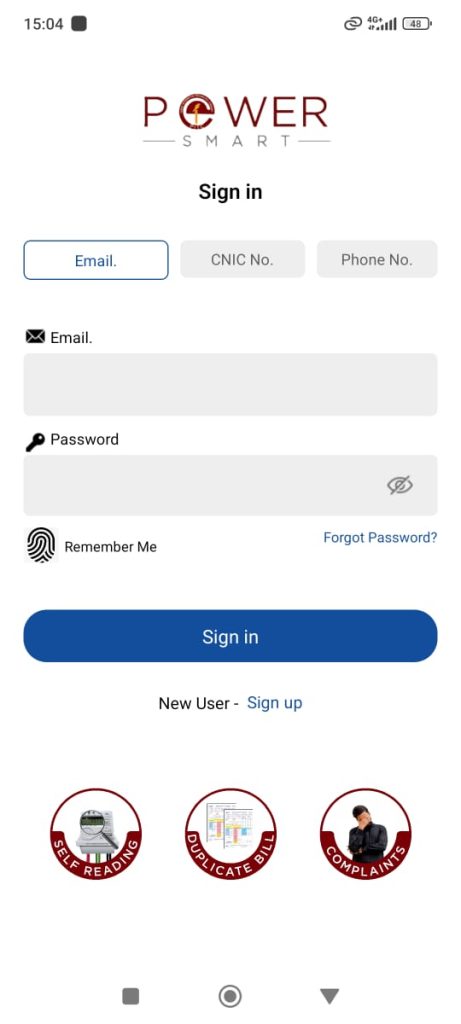
On the main login page, tap Sign up (as shown in the screenshot). - Fill in the Sign-Up Form:
- Distribution Company: Select your electricity company (e.g., IESCO, LESCO, MEPCO, etc.)
- Name: Enter your full name.
- Email: Type your email address.
- Service Provider and Phone Number: Select your mobile company and enter your mobile number.
- CNIC No.: Enter your Computerized National Identity Card number.
- Password: Create a strong password for your account.
- Submit the Form:
Click the Sign up button. - OTP Verification:
- An OTP (One Time Password) will be sent to your registered mobile number or email.
- Enter the OTP code into the app to verify your identity (see the screenshot for the OTP screen).
Congratulations! Your account is now created.
Step 3: Logging in to Your Account
Once registered, follow these steps to log in:
- Open the Power Smart App.
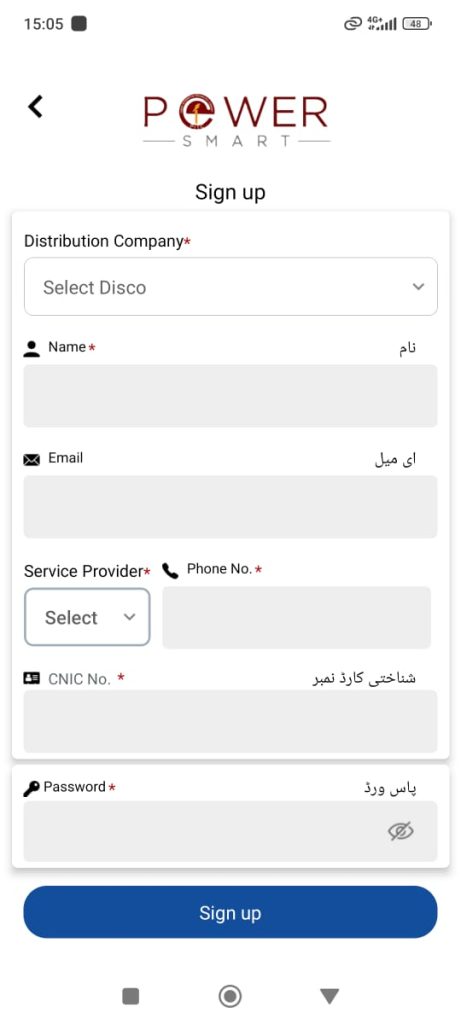
- On the Sign In screen, you can log in with your Email, CNIC No., or Phone No.
- Enter your credentials and password.
- Tap Sign in.
You will be taken to the home screen of the app.
Step 4: Adding Your Meter to the App
To submit readings and view your bills, you need to add your electricity meter.
How to Add a Meter:
- Go to the Home Screen
After logging in, you will see the “Add Meter +” button. - Tap “Add Meter”
The app will prompt you to add your meter if none is found. - Enter Meter Details:
- Select your electricity distribution company (e.g., IESCO, LESCO, etc.)
- Enter your Consumer ID (found on your electricity bill).
- Tap “Add Meter”
The app will now save your meter and show it in your connection list.
If you see “No meter found. Please add meter.”, repeat the above process to link your meter.
Step 5: Using the App
Now that your meter is added, you can:
- Submit your own meter reading.
- View and download duplicate bills.
- Lodge complaints.
- Monitor your electricity usage.
All these options are available from the main dashboard and navigation bar at the bottom of the app.
Troubleshooting
- If you don’t receive an OTP, wait for the timer and then click resend OTP.
- Make sure your Consumer ID is correct to add your meter successfully.
- You can always edit your profile or add more meters from the Settings or Home menu.
Frequently Asked Questions (FAQs)
1. What is the benefit of using the Power Smart app?
The app helps users avoid wrong readings and overbilling, gives direct control over meter reading submission, and allows easy complaint registration and bill viewing.
2. Can I add more than one meter in the app?
Yes, you can add multiple meters by repeating the add meter process.
3. What if I forget my password?
Use the Forgot Password? link on the login screen to reset your password.
4. Which information is required for signup?
You need your distribution company name, CNIC, email, phone number, and a password.
5. How do I find my Consumer ID?
Your Consumer ID is printed on your monthly electricity bill.
6. Who can use this app?
All electricity consumers of supported DISCOs (Distribution Companies) in Pakistan.
7. Is the app free to use?
Yes, the Power Smart app is free to download and use.
Final Words
The Power Smart Application Apna Meter Apni Reading is a smart step toward transparency and convenience in Pakistan’s electricity billing system. With simple registration, easy login, and straightforward meter addition, any user can now manage their electricity bills and readings confidently from their phone. Download the app today and take charge of your electricity usage!